
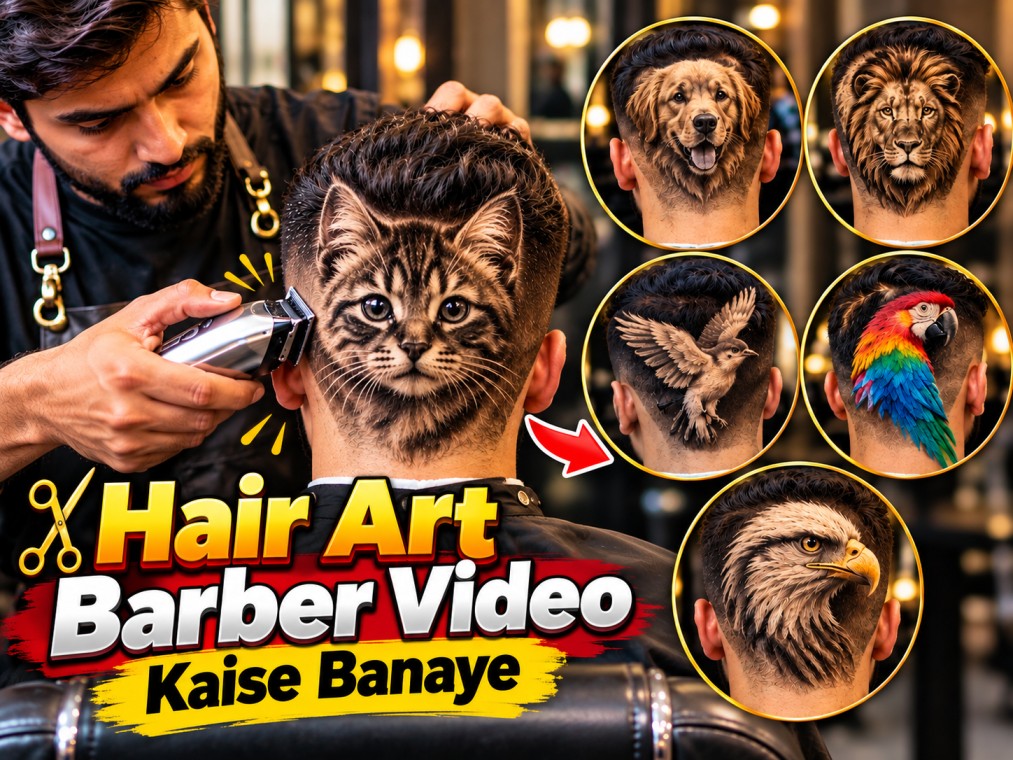
इस Hair Art Barber Video Kaise Banaye Prompts आप देखेंगे की कैसे AI ki help se ultra-realistic create kiye ja sakte hain. 🐱✂️
आप किसी भी एनिमल , Birds , Vegetables, Fruit, Cat, Dog, Lion, Bird, Parrot, Eagle jaise amazing designs ko realistic haircut/hair art transformation में convert kar sakte hain. Yeh concept YouTube Shorts, Instagram Reels, Facebook Reels aur viral AI videos ke liye perfect hai.
नीचे दिया गया Video Prompts को Copy करे और Google FLow के Video Section me Paste कर दे कुछ ही सेकंड में आपका विडियो बन कर तैयार हो जायगा.अगर आप भी AI Video बनाना या सीखना चाहते हो, तो मैंने आपके लिए एक Ebook Pdf Step by Step AI Video के बारे में बताया है, जो लोग इस Ebook को खरीदना है, तो इस लिंक पर क्लिक करे Buy Now
Agar aap AI videos, barber videos, satisfying transformation videos aur viral Shorts banana chahte hain, to yeh concept aapke liye useful hai. AI 4 EBooks Mega Bundle – AI Guide in Hindi
Hair Art Barber Video Kaise Banaye?- Prompts Google Flow
Create an ultra-photorealistic cinematic vertical 9:16 video, approximately 10 seconds long, designed for a highly satisfying viral visual transformation. USER CONCEPT: [Enter Name, Birds, Animals, any Other] Interpret the USER CONCEPT intelligently and transform it into the central visual subject of the video. Do not ask questions. If the concept is an animal, person, object, vehicle, creature, plant, food, architecture, fantasy subject, symbol, or other recognizable thing, preserve its most distinctive and recognizable visual characteristics. CORE VISUAL IDEA: Begin with a realistic professional [BARBER / ARTIST / CREATOR] working on a real human subject in a believable professional environment. The USER CONCEPT is progressively revealed as an extraordinary, hyper-detailed physical design integrated naturally into the subject’s [HAIR / SURFACE / MATERIAL / OBJECT], as though it has been genuinely created there using real-world craftsmanship. The transformation must look physically believable and three-dimensional. The concept must NOT appear as: * a flat printed image * a sticker * a digital overlay * a hologram * a floating object * an obvious CGI projection * an unrelated object placed on top Instead, it must appear organically constructed from and integrated with the existing physical material, with realistic depth, texture, individual strands/details, shadows, highlights and dimensional structure. VIDEO STRUCTURE: 0–2 SECONDS — ESTABLISHMENT Show the subject and the unusual existing design clearly. The camera is already close to the action, using a realistic professional cinematic perspective. Establish the environment, subject position, lighting and scale immediately. 2–6 SECONDS — TRANSFORMATION The professional begins carefully working around the design using realistic tools appropriate to the scene. Show precise hand movements and believable interaction with the physical material. The USER CONCEPT becomes increasingly recognizable and refined as the work progresses. The transformation should feel continuous rather than instantaneous. 6–9 SECONDS — DETAIL REVEAL Continue the realistic finishing work while revealing the most impressive details of the USER CONCEPT. Emphasize: * intricate texture * dimensional depth * realistic individual details * natural material interaction * physically accurate shadows * subtle highlights * craftsmanship * satisfying precision The camera may make a very subtle cinematic push-in or tracking movement, but the composition must remain stable and coherent. 9–10 SECONDS — FINAL REVEAL Finish the transformation and clearly reveal the completed USER CONCEPT. Hold the final result long enough for the viewer to understand exactly what was created. The final frame should be visually striking, highly detailed and immediately understandable without text. VISUAL REALISM: Ultra-photorealistic live-action appearance. Everything must look physically present in the real world. Use realistic: * skin/material texture * hair/material strands * pores and micro-details * reflections * shadows * depth * tool interaction * hand anatomy * object physics * environmental lighting * contact between objects * motion blur The USER CONCEPT must retain recognizable anatomy and defining characteristics while adapting naturally to the physical medium. CAMERA: Vertical 9:16 composition optimized for Instagram Reels. Close cinematic framing. Keep the main subject centered and dominant. Use natural handheld or controlled professional camera movement with subtle depth of field. Do not constantly change camera angle. Maintain strong spatial continuity from beginning to end. LIGHTING: Soft realistic professional indoor lighting with natural highlights and shadows. Maintain consistent lighting direction, exposure, color temperature and environment throughout the entire video. BACKGROUND: A believable professional environment appropriate to the activity. Keep the background naturally out of focus so attention remains on the transformation. CONTINUITY LOCK: The same person, same body position, same head/object orientation, same environment, same lighting, same camera perspective, same hairstyle/material, same tools and same overall composition must remain consistent throughout the entire video. Do not randomly redesign the subject between shots. Do not change the identity or proportions of the USER CONCEPT during the transformation. MOTION: Every movement must follow realistic physical cause and effect. Hands must have correct anatomy and natural finger movement. Tools must contact the surface correctly. Material must respond naturally to cutting, combing, shaping or manipulation. Avoid sudden object creation, disappearing objects, impossible movements or physics-breaking transitions. AESTHETIC: Extremely satisfying craftsmanship. Premium viral social-media visual. Photorealistic. Intricate. Unexpected. Visually impressive within the first second. Strong final reveal. IMPORTANT: Prioritize visual continuity and physical realism over excessive camera movement or cinematic effects. Do not add captions, subtitles, logos, watermarks, UI elements or explanatory text. Do not show the USER CONCEPT as written text anywhere in the scene. The USER CONCEPT itself must be communicated entirely through the visual transformation. NEGATIVE CONSTRAINTS: No cartoon appearance. No illustration. No anime. No plastic CGI appearance. No flat graphic overlay. No sticker effect. No hologram. No floating elements. No duplicated hands. No malformed fingers. No extra limbs. No distorted anatomy. No melting geometry. No flickering. No random scene changes. No sudden camera cuts. No inconsistent lighting. No inconsistent subject identity. No changing hairstyle/material without cause. No disappearing tools. No unexplained object movement. No text. No subtitles. No watermark. FINAL PRIORITY: The result should look like a real professional recorded an extraordinary physical transformation in a real environment—not like an AI-generated animation. Generate the complete video directly from the USER CONCEPT
Latest Post—-
- AI की दुनिया में स्वागत – Welcome to the World of AI
- 99 AI Image & Video Prompts Short Codes | ChatGPT, Google Flow
- Technical Candlestick & Chart Pattern E-Book – Hindi
- 50+ फसलों की खेती की पूरी जानकारी PDF | किसानों के लिए Complete Farming Guide
- AI E-commerce Prompts and Code: Chatgpt, Gemini, Claude, Grok