
AI Image Editing Prompts की मदद से अब photo editing को आसान बनाया जा सकता है। इस guide में आपको 20 ready-to-use AI prompts और shortcuts मिलेंगे, जिनसे आप objects remove या replace कर सकते हैं, background और outfit बदल सकते हैं, image quality enhance कर सकते हैं, cinematic lighting और color grading जोड़ सकते हैं, old photos restore कर सकते हैं और product images को professional बना सकते हैं। AI Prompt Engineering Kya Hai?
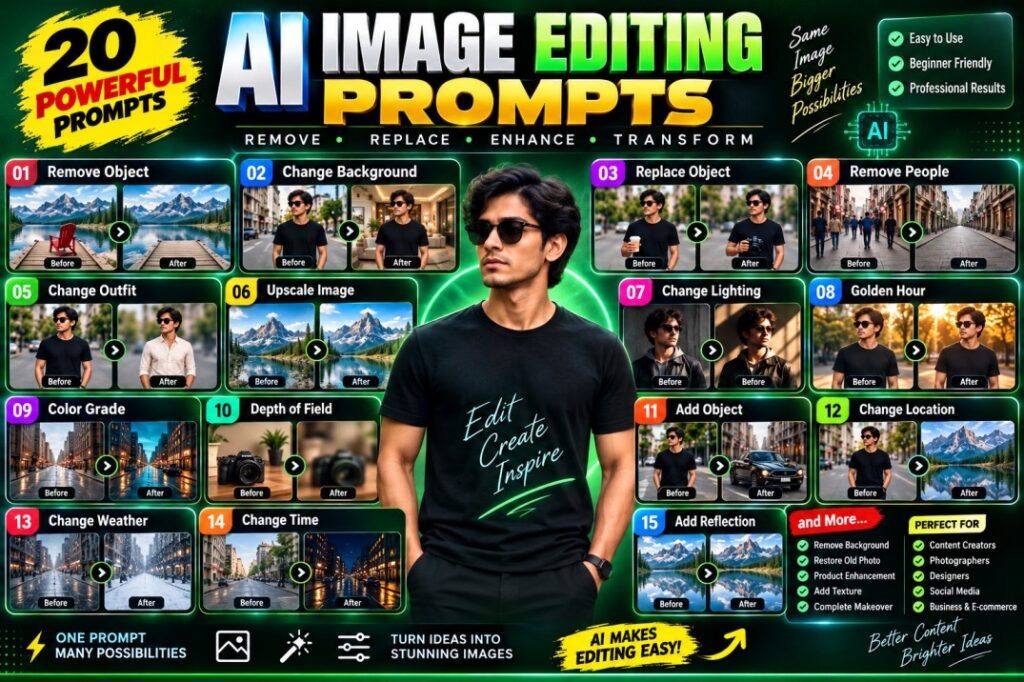
01. REMOVE OBJECT — वस्तु हटाना
Prompt:
Remove the unwanted object from the image while keeping the background natural and realistic.
हिंदी में मतलब:
- फोटो में मौजूद unwanted/object को हटाने के लिए।
- हटाई गई जगह पर background को natural और realistic रखना है।
- Lighting, shadows और surrounding details भी natural रहें।
उदाहरण:
किसी फोटो से chair, bag, bottle, vehicle या कोई अन्य object हटाना।
02. CHANGE BACKGROUND — Background बदलना
Prompt:
Replace the background with a modern luxury interior while keeping the subject unchanged.
हिंदी में मतलब:
- सिर्फ background को बदलना है।
- व्यक्ति/मुख्य subject को बिल्कुल unchanged रखना है।
- नया background luxury और realistic दिखाई देना चाहिए।
उदाहरण:
Road पर खड़ी photo → Luxury room में convert करना।
03. REPLACE OBJECT — Object बदलना
Prompt:
Replace the object in the subject’s hand with [OBJECT] while maintaining realistic lighting and shadows.
हिंदी में मतलब:
- हाथ में मौजूद object को किसी दूसरे object से replace करना है।
[OBJECT]की जगह अपनी desired वस्तु लिखें।- नई वस्तु पर सही lighting और shadow होनी चाहिए।
उदाहरण:
Phone → Camera
Cup → Bottle
Book → Laptop
04. REMOVE PEOPLE — लोगों को हटाना
Prompt:
Remove all unwanted people from the background while preserving the original environment naturally.
हिंदी में मतलब:
- Background में मौजूद unwanted लोगों को हटाना है।
- Main subject को नहीं हटाना है।
- खाली हुई जगह को original environment के अनुसार naturally fill करना है।
उदाहरण:
Crowded street → Same street लेकिन बिना लोगों के।
05. CHANGE OUTFIT — कपड़े बदलना
Prompt:
Change the subject’s outfit to [OUTFIT DESCRIPTION] while keeping the face, pose, and identity unchanged.
हिंदी में मतलब:
- सिर्फ कपड़े/outfit बदलने हैं।
- Face, pose और identity को unchanged रखना है।
[OUTFIT DESCRIPTION]में अपना outfit लिखें।
उदाहरण:[OUTFIT DESCRIPTION] = premium white formal shirt and black trousers
AI Image Editing Prompts ENHANCE & TRANSFORM
06. UPSCALE IMAGE — Image Quality बढ़ाना
Prompt:
Enhance this image into high-resolution, sharp, detailed quality while preserving all original details.
हिंदी में मतलब:
- Low-quality photo को high-resolution बनाना।
- Image को sharper और detailed करना।
- Original face, objects और details को preserve करना।
उपयोग:
Blurred/low-resolution photo को enhance करने के लिए।
07. CHANGE LIGHTING — Lighting बदलना
Prompt:
Transform the lighting into dramatic cinematic lighting with realistic shadows and highlights.
हिंदी में मतलब:
- Photo की lighting को cinematic बनाना।
- Realistic shadows और highlights add करना।
- Image को movie-style dramatic look देना।
उदाहरण:
Normal daylight → Dark cinematic movie lighting.
08. GOLDEN HOUR — Golden Hour Effect
Prompt:
Change the scene lighting to warm golden hour while keeping the subject unchanged.
हिंदी में मतलब:
- Photo में sunset/sunrise जैसा warm golden light देना।
- Subject को unchanged रखना है।
- Skin और environment पर natural warm glow दिखाई दे।
उपयोग:
Outdoor portrait को cinematic sunset look देने के लिए।
09. COLOR GRADE — Cinematic Color Grading
Prompt:
Apply a cinematic color grade with rich contrast, balanced skin tones, and professional film-like colors.
हिंदी में मतलब:
- Photo में professional cinematic color grading करना।
- Contrast को rich बनाना।
- Skin tone natural रखना।
- Film/movie जैसा color look देना।
उपयोग:
Professional photography और cinematic portraits में।
अगर आप भी AI Video बनाना या सीखना चाहते हो, तो मैंने आपके लिए एक Ebook Pdf Step by Step AI Video के बारे में बताया है, जो लोग इस Ebook को खरीदना चाहते है, तो इस लिंक पर क्लिक करे Buy Now
10. DEPTH OF FIELD — Background Blur
Prompt:
Create realistic shallow depth of field and naturally blur the background while keeping the subject sharp.
हिंदी में मतलब:
- Main subject को sharp रखना।
- Background को naturally blur करना।
- DSLR/camera जैसी shallow depth of field बनाना।
उदाहरण:
Person/Object sharp + पीछे का पूरा background soft blur.
AI Image Editing Prompts CREATIVE EDITS
11. ADD OBJECT — नई वस्तु जोड़ना
Prompt:
Add [OBJECT] naturally into the scene with matching lighting, shadows, and perspective.
हिंदी में मतलब:
- Photo में कोई नया object add करना।
- Object की lighting scene से match होनी चाहिए।
- Shadow और perspective realistic होना चाहिए।
उदाहरण:
Person के पास car, table पर laptop या road पर bike add करना।
12. CHANGE LOCATION — Location बदलना
Prompt:
Place the subject in [LOCATION] while maintaining the original face, pose, and proportions.
हिंदी में मतलब:
- Subject को दूसरी location पर transfer करना।
- Face, pose और body proportions unchanged रखने हैं।
- New location realistic दिखाई देनी चाहिए।
उदाहरण:
City → Switzerland
Room → Beach
Street → Mountain
13. CHANGE WEATHER — मौसम बदलना
Prompt:
Transform the weather into [RAINY / SNOWY / FOGGY] conditions with realistic environmental effects.
हिंदी में मतलब:
- मौसम को बदलना।
[RAINY / SNOWY / FOGGY]में से desired weather चुनना।- Rain, snow या fog के realistic environmental effects add करना।
उदाहरण:
- Sunny → Rainy
- Summer → Snowy
- Clear → Foggy
14. CHANGE TIME — दिन से रात
Prompt:
Transform the scene from day to night with realistic artificial lighting and natural shadows.
हिंदी में मतलब:
- Daytime photo को nighttime में बदलना।
- Street lights, building lights आदि realistic दिखने चाहिए।
- Natural shadows और night ambience maintain करना।
उदाहरण:
Day street → Cinematic night street.
15. ADD REFLECTION — Reflection जोड़ना
Prompt:
Add realistic reflections to the scene based on the existing lighting and environment.
हिंदी में मतलब:
- Scene में realistic reflection add करना।
- Existing lighting और environment के अनुसार reflection बनाना।
- Reflection artificial या pasted जैसा नहीं दिखना चाहिए।
उदाहरण:
Lake में mountain reflection, wet road पर building lights reflection।
🟠AI Image Editing Prompts PROFESSIONAL EDITS
16. REMOVE BACKGROUND — Background हटाना
Prompt:
Remove the background cleanly while preserving fine details around the subject.
हिंदी में मतलब:
- Main subject को background से अलग करना।
- Background completely remove करना।
- Hair, clothes और body edges जैसे fine details preserve करना।
उपयोग:
Product photo, profile photo, PNG creation आदि।
17. RESTORE OLD PHOTO — पुरानी Photo Restore करना
Prompt:
Restore and enhance this old photograph while preserving the original face and details.
हिंदी में मतलब:
- पुरानी/damaged photo को restore करना।
- Scratches, fading और quality problems को सुधारना।
- Original face और important details को preserve करना।
उपयोग:
पुरानी family photos को restore करने के लिए।
18. PRODUCT ENHANCEMENT — Product Photo को Premium बनाना
Prompt:
Transform this product image into a premium commercial advertisement with professional studio lighting.
हिंदी में मतलब:
- Simple product photo को professional advertisement जैसा बनाना।
- Studio-quality lighting लगाना।
- Product को premium commercial presentation देना।
उदाहरण:
Perfume bottle → Luxury perfume advertisement.
19. ADD TEXTURE — Texture जोड़ना
Prompt:
Add realistic [TEXTURE] to the surface while maintaining natural material details.
हिंदी में मतलब:
- किसी surface पर नया texture add करना।
[TEXTURE]की जगह desired texture लिखें।- Original material की natural details maintain करनी हैं।
उदाहरण:
[TEXTURE] = concrete[TEXTURE] = marble[TEXTURE] = wood grain[TEXTURE] = rough stone
20. AI Image Editing Prompts COMPLETE MAKEOVER — Full Image Makeover
Prompt:
Transform this image into a high-end professional visual while preserving the main subject and composition.
हिंदी में मतलब:
- पूरी image को premium/professional look देना।
- Main subject को preserve करना।
- Original composition को बनाए रखते हुए overall visual quality improve करना।
- Lighting, colors, background, details और overall presentation को enhance किया जा सकता है।
उपयोग:
Social media, advertising, portfolio और professional photography के लिए।
⚡ Quick Short-Code List
इन्हें आप अपने AI Image Editing Prompt Bundle में shortcut की तरह रख सकते हैं:
| Code | Short Command | काम |
|---|---|---|
/removeobject | Remove Object | Object हटाना |
/changebg | Change Background | Background बदलना |
/replaceobject | Replace Object | Object replace करना |
/removepeople | Remove People | लोग हटाना |
/changeoutfit | Change Outfit | कपड़े बदलना |
/upscale | Upscale Image | Quality बढ़ाना |
/lighting | Change Lighting | Lighting बदलना |
/goldenhour | Golden Hour | Warm sunset look |
/colorgrade | Color Grade | Cinematic colors |
/dof | Depth of Field | Background blur |
/addobject | Add Object | Object जोड़ना |
/location | Change Location | Location बदलना |
/weather | Change Weather | मौसम बदलना |
/changetime | Change Time | Day/Night बदलना |
/reflection | Add Reflection | Reflection जोड़ना |
/removebg | Remove Background | Background हटाना |
/restore | Restore Old Photo | Old photo सुधारना |
/productenhance | Product Enhancement | Product photo premium बनाना |
/texture | Add Texture | Texture जोड़ना |
/makeover | Complete Makeover | Full professional makeover |
🔥 सबसे आसान Formula
इन prompts में [OBJECT], [OUTFIT DESCRIPTION], [LOCATION], [TEXTURE] जैसे हिस्से variable fields हैं। इन्हें बदलकर एक ही shortcut से बहुत सारी अलग-अलग images बनाई जा सकती हैं।
Example:
/changeoutfit
→ Change the subject's outfit to a premium black suit while keeping the face, pose, and identity unchanged.
/location
→ Place the subject in Paris at night while maintaining the original face, pose, and proportions.
/replaceobject
→ Replace the object in the subject's hand with a premium smartphone while maintaining realistic lighting and shadows.
Keywords:- AI Image Editing Prompts, AI Photo Editing Prompts, AI Image Editing, AI Photo Editing, AI Photo Editing Shortcuts, AI Image Editing Commands, AI Background Change Prompt, AI Object Removal Prompt, AI Object Replacement Prompt, AI Outfit Change Prompt, AI Background Removal Prompt, AI Image Enhancement,
AI Photo Enhancement, AI Image Transformation, AI Photo Editing Tricks,
AI Editing Tools, AI Prompts in Hindi, AI Image Editing Hindi, ChatGPT Image Editing,
Pingback: Using AI in Hindi & Hinglish-हिंदी में AI का इस्तेमाल -